◇ SPREADSHEETSPart of the Ettex Office Suite

Every number, formula and chart in one sheet

Budgets, trackers and calculations with formulas, conditional formatting and charts.
Secure by designYour data is encrypted and private
Built for teamsReal-time collaboration that just works
Works anywhereIn the cloud, on desktop or on mobile
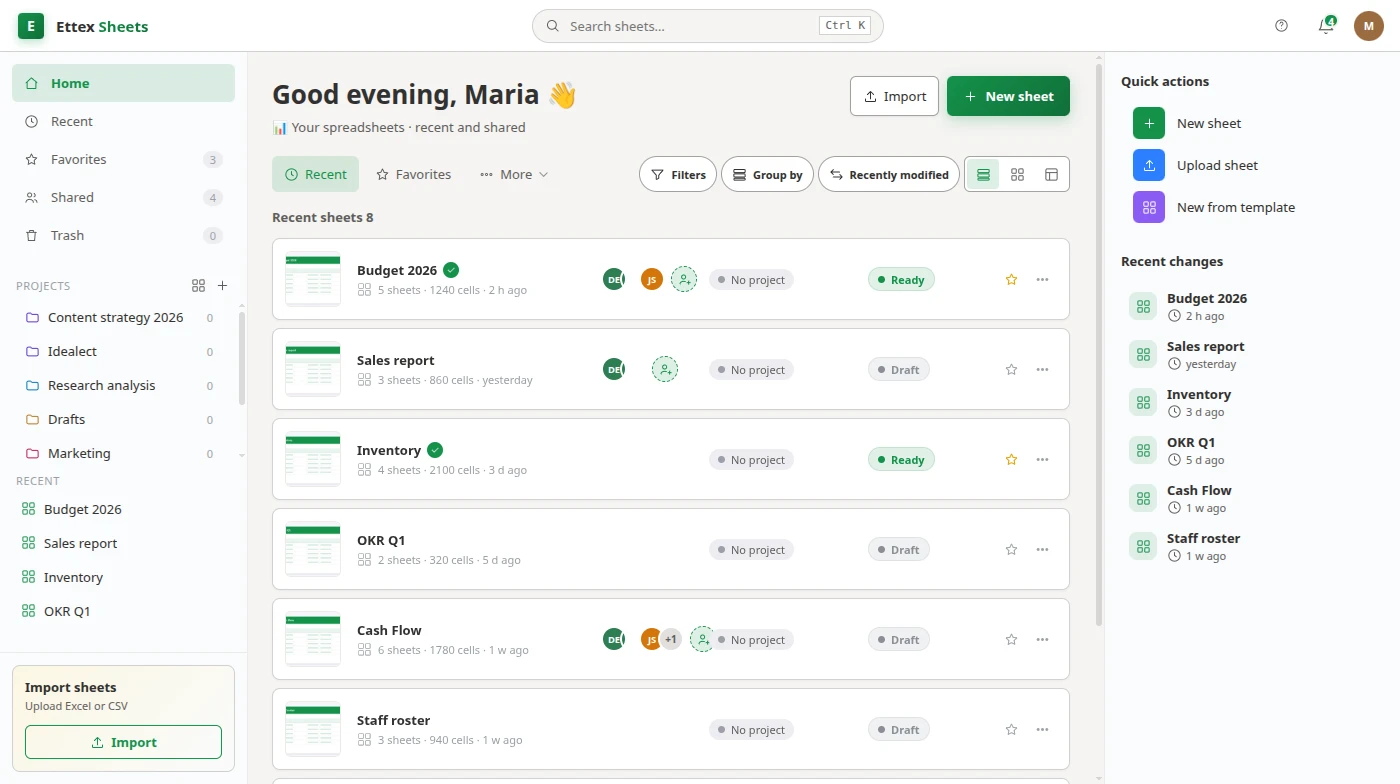
The Spreadsheets workspace
Works with your favorite formatsXXLSXCSVPDF
Powerful features

Everything you need in Spreadsheets

Formulas & functions

Hundreds of functions with instant recalculation.

Conditional formatting

Highlight what matters with rules and color scales.

Charts & graphs

Turn ranges into bar, line and pie charts in a click.

Filters & pivots

Sort, filter and summarize large tables with ease.

Inside Spreadsheets

Calculate with confidence.
Visualize in a click.

Budgets, trackers and calculations with formulas, conditional formatting and charts.

  • Formulas and functions
  • Charts and pivot tables
  • CSV / XLSX import and export
  • Cell formatting and styles
  • Real-time collaboration
Explore all products
How it works

From data to insight in 3 steps

1

Import or start blank

Open XLSX/CSV or begin with an empty sheet.

2

Add formulas

Compute, reference and cross-link across sheets.

3

Chart & share

Visualize results and share with your team.

One office, every tool

Seamlessly switch between apps and keep everything in one place.

Product preview

A closer look at Spreadsheets

The Spreadsheets workspace
Explore all products

Frequently asked questions

Is Ettex Spreadsheets a good alternative to Microsoft Excel or Google Sheets?

Yes. Ettex Spreadsheets covers formulas, conditional formatting and charts with real-time collaboration — switch from Excel or Google Sheets without losing your workflow.

Does it support formulas and charts?

Hundreds of functions, pivots and chart types are built in, with live recalculation.

Guides for Sheets users

Practical write-ups from the people building it.

Capital costs: what to capitalise and what to put through the P&LRoles and responsibilities: writing them so people actually use themHow to price a job: labour, materials, overhead and the margin you keepProduction scheduling software: sequencing work the shop floor can actually runJob estimating software: pricing work from what it actually costsJob costing software: knowing which jobs made money and which did notConstruction job costing software: tracking cost against the programmeSoftware license management: staying compliant without overbuyingContingent workforce: managing the people who are not on payrollSkills gap analysis: finding out what your team cannot do yetSalary bands: how to build pay ranges that hold up to scrutinyCompensation review: running the annual pay cycle fairly and on budgetWorkforce planning: matching the people you have to the work aheadHeadcount planning: setting positions, budgets and hiring dates finance can trustPicking list: what to put on it and how to order the linesQuality control sheet: recording measurements so the data is usable laterBid comparison: evaluating quotes fairly when they are not like for likeProduction schedule: sequencing the work you can actually doData dictionary: agreeing what the fields actually meanRequirements traceability matrix: proving every requirement was testedGoing concern: the assessment directors sign before the accountsBusiness impact analysis: deciding what has to come back firstPlanned preventive maintenance: the schedule is the whole systemHS code: a decision you record, not a number you look up once
All 84 Sheets guides → All articles

Ready to get started with Spreadsheets?

Join thousands of teams already using Ettex Spreadsheets.

Try it